
How to Get a Zoom Meeting/Webinar for Your Show
This page is a work in progress. The information here may or may not be accurate.
Here are some definitions of terms that may help you understand this article:
R2 Reservation
In R2, there are several Rental Items and one Miscellaneous Item for Zoom. The Miscellaneous Item only matters to those of you who are not operating out of Indianapolis HQ.
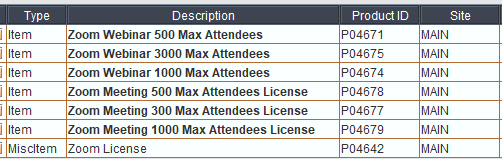
As you can see, the Rental Items reflect different types of Zoom events (Meeting or Webinar) that allow up to a certain number of attendees. One thing to note is that one reserved license is good for up to three simultaneous events up to that type. In the chart below, rows are the types of licenses you can reserve, and columns are the types of Zoom events that are covered by that license.
Meeting 300
✅ ❌ ❌ ❌ ❌ ❌ Meeting 500 ✅ ✅ ❌ ❌ ❌ ❌ Meeting 1000 ✅ ✅ ✅ ❌ ❌ ❌ Webinar 500 ✅ ❌ ❌ ✅ ❌ ❌ Webinar 1000 ✅ ❌ ❌ ✅ ✅ ❌ Webinar 3000 ✅ ❌ ❌ ✅ ✅ ✅Here are some examples to help make sense of the chart:
Indianapolis HQ
If the R2 order for your event is coming out of Indianapolis HQ, you do not need to think about the Miscellaneous Item Zoom License (ProductID P04642). Simply reserve the Rental Item(s) corresponding to the type(s) of Zoom Event(s) you need.
Other Locations
If you are operating out of another location, then on your primary order, add the Miscellaneous Item Zoom License (ProductID P04642) to your primary R2 order. In addition, also create an R2 order out of Indianapolis HQ that includes the Rental Item(s) corresponding to the type(s) of Zoom Event(s) you need.
Production Request
After you submit a Production Request Form, Event IT staff will create the necessary Zoom Events for you.